Browse the guide
Start here
Everyday work
- Find and arrange documents
- Upload, preview & download
- Organize your documents
- Work with several documents
- Comments & mentions
- History & activity
- Archive, delete & recovery
Administration
- Administrator setup
- Users & permissions
- Manage categories & tags
- Associated record documents
- Stage requirements & gates
- Connect PandaDoc
Help & reference
Work with several documents
Select documents on a record, add up to ten tags to as many as 1,000 at once, move a selection to a category, and download up to 25 documents.
Make a selection
- Choose Select above the document list.
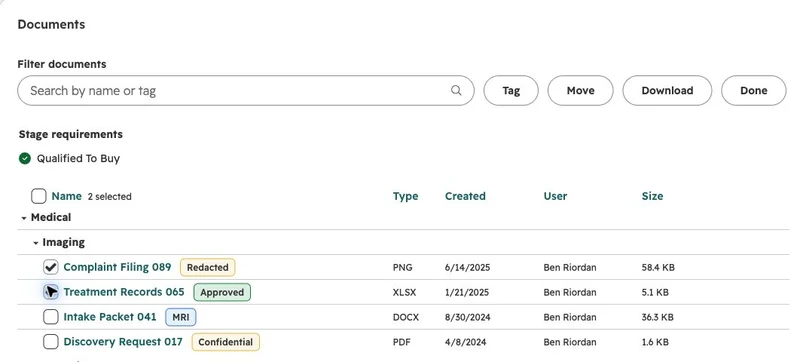
- Tick individual documents, or use the header checkbox to select every document that matches the current filter.
- Check the selected count beside Name.
- Choose Tag, Move, or Download, then select Done to leave Select mode.
Note
Documents you selected before changing the filter can stay selected even when they are hidden, so check the count after filtering.
Add tags to a selection
Choose Tag, queue tags under Tags to add, then select Add tags. You can add up to ten tags to as many as 1,000 documents at once.
Bulk tagging only adds tags. It never removes or replaces existing ones, and it skips a tag a document already has.
Move a selection
Choose Move, pick a category or Uncategorized, then confirm with Move. Up to 1,000 documents can move in one operation.
A move either fully succeeds or fails with nothing moved. A lower moved count can mean someone archived or deleted a selected document first.
Download up to 25 documents
Choose Download for up to 25 selected documents. Each file saves separately, in list order, not as a ZIP.
- The progress window tracks download attempts but can’t confirm every file reached your device.
- If your browser interrupts the batch, allow multiple downloads when asked. Use a document’s Save link for any missing file, or Save all again. Select Done when finished.
Note
Viewers can download documents one at a time, but Select mode is only for Editors and Admins. This release has no batch Archive or Delete.
Not using DocAI yet? Try it on one workflow for a week.
Apply for $100 trial