Tool comparison · verified November 10, 2026
PandaDoc vs. DocAI by TortScale
Create, send, negotiate, sign, and track proposals, quotes, and agreements with HubSpot data. Compare the scope, pricing, HubSpot connection, and the other pieces required for the workflow you need.
 PandaDoc
 DocAI by TortScale
Make the call
Choose the tool for the work you need done.
These products solve different jobs. Here is the practical trigger for keeping the other product, choosing DocAI, or using both.
Keep or choose PandaDoc
Best when this is the main job
Sales teams whose primary job is producing branded documents and collecting signatures or payments.
Choose DocAI
Best when the HubSpot record workflow is the gap
You already create and sign in PandaDoc and want completed PDFs to continue into matched HubSpot records, with configured classification and document-stage checks.
Use both
When the jobs complement each other
This is usually a keep-and-connect decision: PandaDoc creates and signs; configured DocAI handoff manages the completed file in HubSpot. It does not backfill drafts or prior documents.
Price snapshot: Free; Starter $19/mo annual; Business $49/seat/mo annual; Enterprise quote. See source notes and dated terms below.
Product views
PandaDoc and DocAI, side by side.
See the product interface, then compare the job each tool handles and the pieces still required around it.

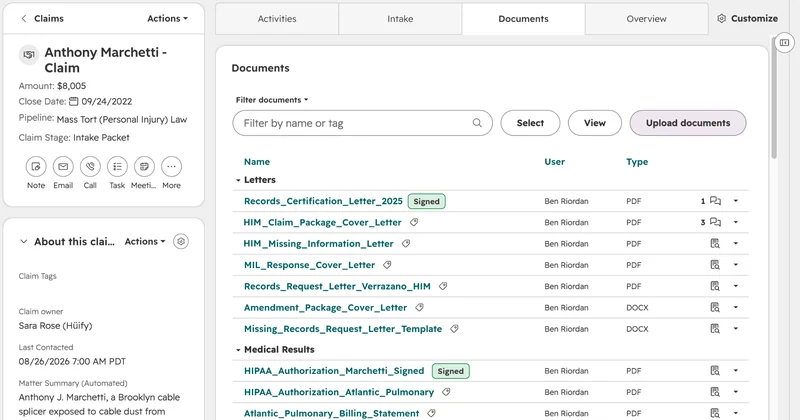
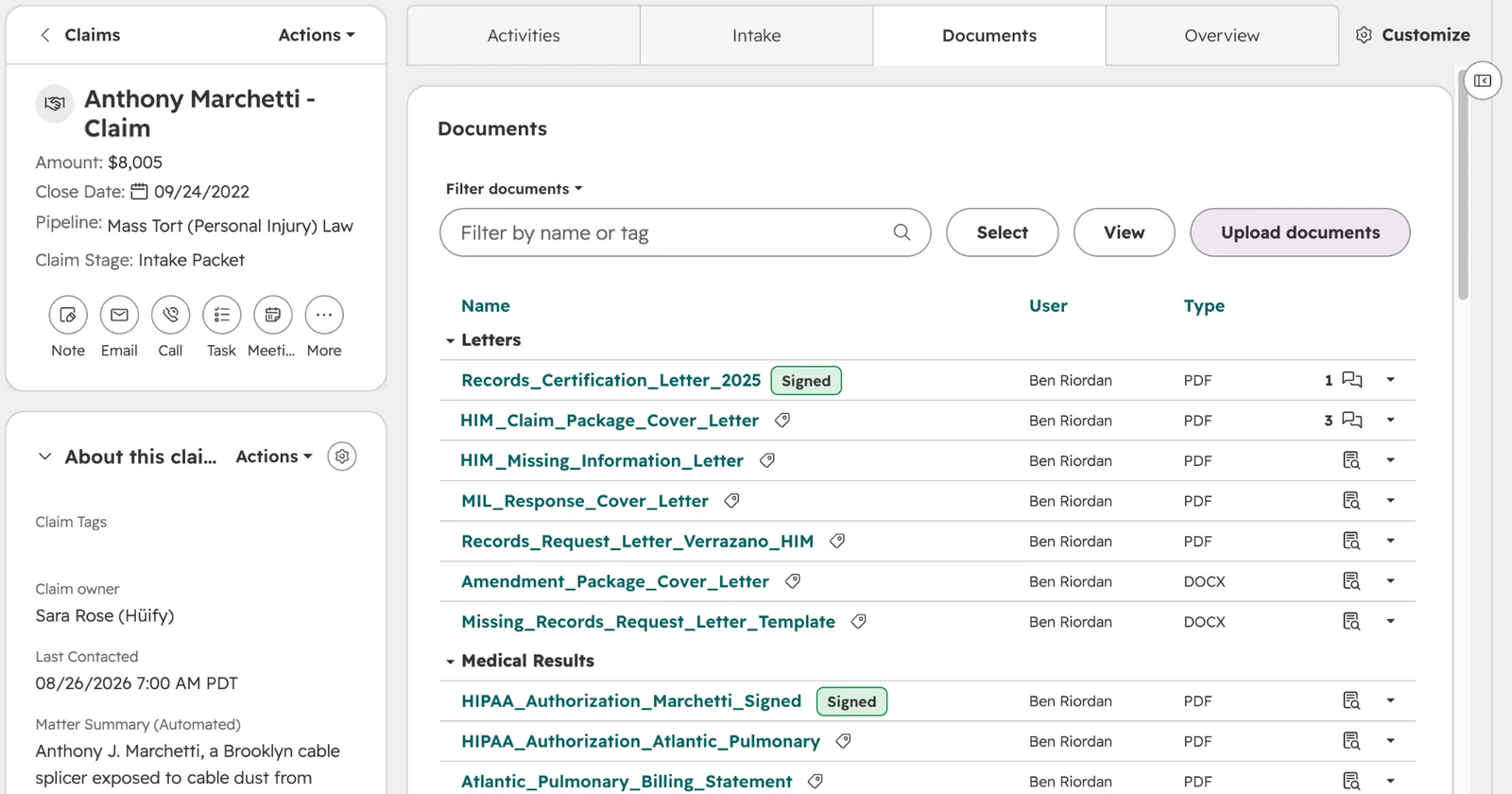
Product image: PandaDoc HubSpot integration source. Product marks come from the vendor site, HubSpot Marketplace, or Simple Icons. Logos and interface images identify the products being compared; marks remain the property of their owners.
PandaDoc + DocAI workflow
Create in PandaDoc. Keep working in DocAI.
The strength is the handoff after signature: the finished document does not stop at a PandaDoc status or sit in an email attachment.
1 · Create
Build a reusable PandaDoc template and populate it with the HubSpot context used for the agreement.
2 · Complete
The recipient reviews and signs in PandaDoc. Its document_completed_pdf_ready event signals that the sealed PDF is ready.
3 · Import
DocAI automatically receives the completed PDF and places it on the matched HubSpot record.
4 · Classify
Configured tag mappings apply the DocAI category and classification tags as the document arrives.
5 · Continue the workflow
DocAI evaluates the document against configured stage requirements and updates the matching Document gate property, which can be configured as a native HubSpot conditional stage requirement.
Why the integration matters
This connects PandaDoc’s template and signature strengths with DocAI’s post-sign document management in HubSpot. The exact connected sequence is a DocAI differentiator; the comparison is about the configured workflow, not a claim that other vendors cannot offer related features.
See setup steps, tag mapping, record matching, and verification
Setup requires production PandaDoc API access, a webhook shared key, an active completion subscription, and a HubSpot record reference. The connection imports completed sealed PDFs; it does not import drafts or backfill prior documents.
Side-by-side
The overlap and the remaining work.
This comparison distinguishes storage, collection, generation, signing, and record-level document management rather than treating them as one category.
| Dimension | PandaDoc | DocAI by TortScale · current scope |
|---|---|---|
| Primary job | Create, send, negotiate, sign, and track proposals, quotes, and agreements with HubSpot data. | Manage documents on supported HubSpot records. |
| Published starting price | Free; Starter $19/mo annual; Business $49/seat/mo annual; Enterprise quote. | Essentials starts at $500/month; a $100 one-week trial starts after workflow scope is agreed. Plans are priced by document volume and service level. |
| HubSpot connection | PandaDoc templates/signatures use CRM context; DocAI receives completed PDFs through its completion webhook. | Documents live in the context of HubSpot CRM records. |
| Record-level documents | Completed sealed PDFs are automatically imported to the matched HubSpot record when configured. | Contact, company, deal, and ticket document workspace. |
| Organize and control | PandaDoc manages authoring/signature; DocAI takes over post-sign filing, category/tag mapping, history, access, and record context. | Categories/tags, bulk actions, roles/permissions, history, lifecycle actions, and stage requirements. |
| Client collection | PandaDoc collects signer inputs; DocAI’s current connection is for completed-document handoff, not general client file requests. | Internal document management; client-facing collection is not the current product scope. |
| Generate/sign | Strong template-driven creation, document routing, and e-signature; completed copies flow to DocAI. | PandaDoc connection for completed documents; signature generation remains the signing provider’s job. |
| Document intelligence | Use the vendor’s current plan/product documentation; do not assume OCR or AI is included. | OCR, full-text search, cited answers, and agent tools are roadmap items, not available today. |
What you may need alongside it
The surrounding tool stack matters.
PandaDoc is strong at template-driven creation, collaboration, and agreement execution. DocAI extends that workflow after signature: completed PDFs automatically move into the matched HubSpot record, where DocAI classification, history, permissions, and stage requirements continue the work. The exact PandaDoc-to-DocAI handoff is a differentiating connected workflow; compare competitors against the full configured path rather than assuming either a PandaDoc HubSpot connector or a generic file library provides the same sequence. Setup requires production API/webhook credentials and a record-matching reference. Drafts and past documents are not automatically imported by this connection.
- HubSpot CRM
- PandaDoc subscription sized for seats, templates, and usage
- HubSpot integration and field mappings
- A separate document-management layer if the team needs broader file organization and record history
- Storage/retention and legal-signature policy
Decision note: This is usually a keep-and-connect decision: PandaDoc creates and signs; configured DocAI handoff manages the completed file in HubSpot. It does not backfill drafts or prior documents.
This is a planning list, not a statement that every deployment needs every item. Confirm security, retention, licensing, and HubSpot compatibility for the actual workflow. For storage products, confirm file migration, source of truth, and sync behavior; a comparison does not imply automatic storage sync unless a configured integration is specifically described.
Sources and pricing notes
Primary sources checked for this page.
Public plan prices can change, depend on billing term or region, and may exclude taxes, add-ons, implementation, or required HubSpot licenses.
PandaDoc’s official pricing page lists Free at $0, Starter at $19/month billed annually, Business at $49/seat/month billed annually, and Enterprise as quote-based. HubSpot integration and usage-credit rules vary by plan and feature.
Research date: November 10, 2026. Where a vendor does not publish a current, comparable price, the page says so instead of estimating one.
Before you start
Common questions
Does PandaDoc replace DocAI?
PandaDoc is strong at template-driven creation, collaboration, and agreement execution. DocAI extends that workflow after signature: completed PDFs automatically move into the matched HubSpot record, where DocAI classification, history, permissions, and stage requirements continue the work. The exact PandaDoc-to-DocAI handoff is a differentiating connected workflow; compare competitors against the full configured path rather than assuming either a PandaDoc HubSpot connector or a generic file library provides the same sequence. Setup requires production API/webhook credentials and a record-matching reference. Drafts and past documents are not automatically imported by this connection.
What does PandaDoc cost?
PandaDoc’s official pricing page lists Free at $0, Starter at $19/month billed annually, Business at $49/seat/month billed annually, and Enterprise as quote-based. HubSpot integration and usage-credit rules vary by plan and feature.
What else may a team need with PandaDoc?
The required stack depends on storage, CRM record context, permissions, automation, external collection, and signing needs. See the tools-needed section on this page.
Start with one workflow
See the workflow on your HubSpot records.
Bring one real document process. We’ll map what DocAI handles, what stays in your existing tools, and what a complete setup requires.